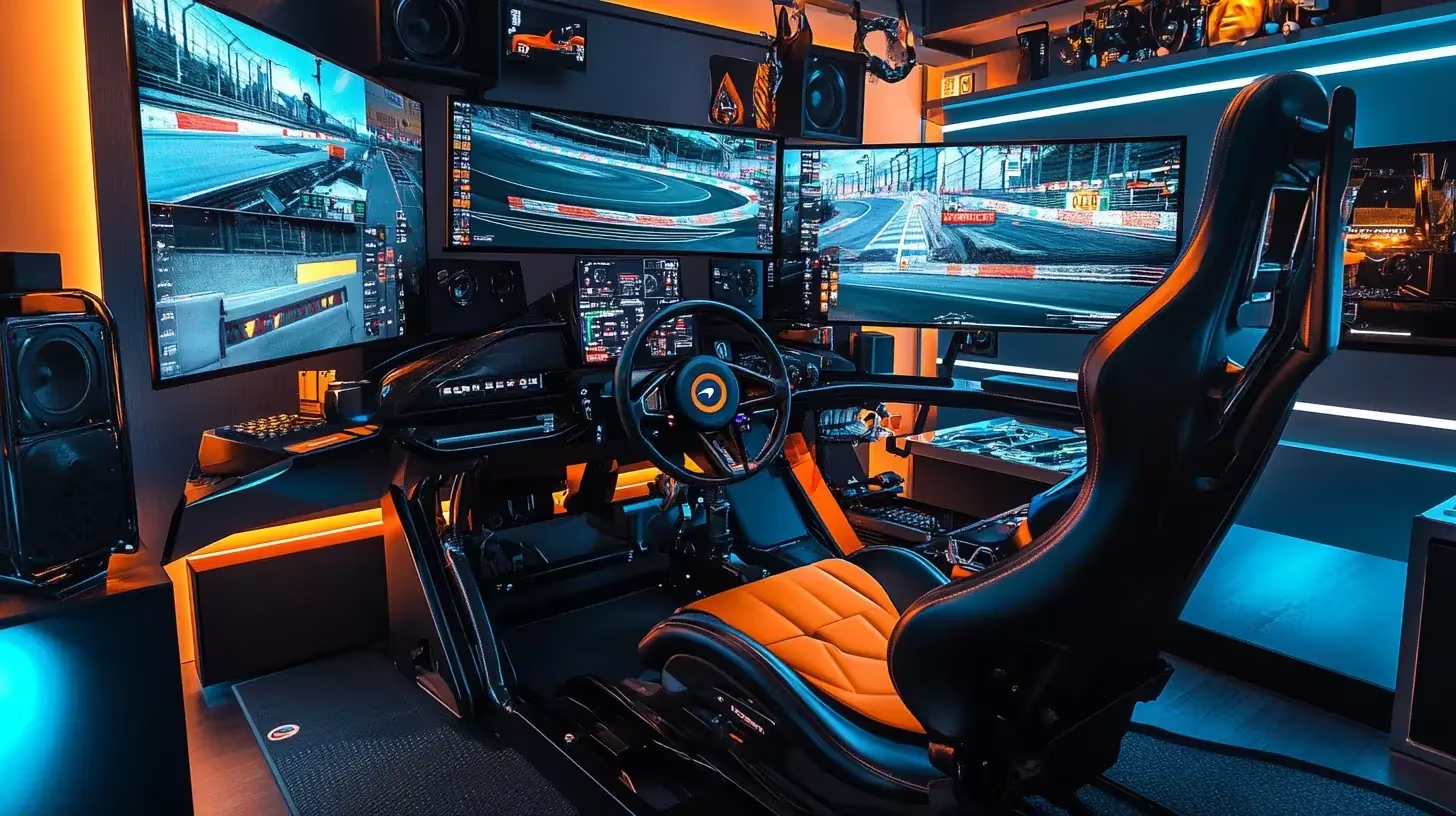
Lando Norris is known for his Twitch humor and wheel-to-wheel battles, but he also trains hours in a simulator that barely differs from a factory test rig. Cool Performance – the company he runs with brother Oliver – built two custom cockpits for his home: a single-seater rig and a GT variant. In this deep dive we unravel the hardware and software of that setup and show how you can apply the same principles in your own sim corner.
Hub: Browse all F1 driver rigs in the cluster: Complete F1 Driver Sim Racing Setups (2025).
Family project: Cool Performance cockpit as base
The heart of Norris’ simulator is a custom-built monocoque. Cool Performance delivers him both the Formula Pro and GT Pro cockpit, so he can switch between an F1 position and a GT posture. Thanks to the welded aluminum/composite construction, there is zero flex, even with wheelbases of 30 Nm. The Cool Performance Formula Pro is delivered including installation; pedal plate, steering column and harness mounting are adjusted to your body build.
For GT sessions, Norris uses a Sabelt GT Pad bucket seat. The modular cushion system lets him adjust support for sprint or endurance training and stays comfortable with a 6-point harness. If you prefer to work modular, you can combine the same seat with an 8020 frame like the Sim-Lab P1-X.
Why Norris has two cockpits
The Formula Pro rig replicates exactly the seating position of an F1 car: low hips, stretched legs and a wheel that almost rests on the chest. In that position, Norris trains starts, qualifying runs and quick changes of brake bias. The GT Pro cockpit is higher and wider. In it he can prepare GT3 and LMP events without overloading his muscles in a forced position. Moreover, he often uses the GT position for streams; the extra space leaves room for the Logitech keyboard and Stream Deck, while the Formula rig is mainly intended for focus runs. This way he stays physically used to both driving styles he needs during the season.
Screens, tactile feedback and audio
Norris drives on a triple set of 32-inch AOC CQ32G3SU monitors at 165 Hz, tight around his cockpit for a FOV of about 180 degrees. A fourth 24-inch screen functions as telemetry and strategy board, so he can follow deltas and tire temperatures without an engineer next to him. For physical feedback, a Buttkicker Gamer 2 under the seat suffices: enough vibration to feel kerbs and lock-ups without a motion platform. In terms of audio, he usually uses a SteelSeries Arctis 7; the Logitech Z533 speakers are ready for casual runs or streams.
Wheelbase & wheel: industrial precision
The most discussed component of Norris’ rig is the direct-drive base. He trusts the Leo Bodnar SimSteering2 Pro: an industrial servo with 26 Nm torque and an encoder resolution of millions of steps. Cool Performance calibrates the base with McLaren data, so virtual and real steering moments are close together.
As a wheel, Norris uses a Cool Performance CP-S Formula Wheel with carbon body, 5-inch display and dual-clutch paddles for starts. The button layout copies a modern F1 rim, complete with rotaries for brake bias, torque maps and radio.
Looking for a more accessible alternative? The Simucube 2 Pro offers 25 Nm, TrueDrive profiles and lots of community support. Combine that base with a Precision Sim Engineering LM-X or choose a compact ecosystem like the Fanatec CSL DD when 8 Nm is sufficient.
Hydraulic pedals and brake feel
Brake feel is where Norris seeks the most gain. That’s why he drives on the Cool Performance Hydraulic Pedals, a Quaife-developed set with hydraulic brake up to 200 bar and hall sensors for throttle and clutch. With preset profiles, he switches lightning-fast between rain, qualifying or endurance settings and compares brake pressures via MoTeC. No custom budget? Look at the Heusinkveld Sim Pedals Ultimate+ or programmable Simucube ActivePedal.
PC, peripherals and streaming tools
Norris runs his sims on a high-end PC (RTX 5080 class), but his peripherals remain basic: a Logitech MK220 keyboard/mouse for menus and an Elgato Stream Deck+ for OBS shortcuts. A fifth display shows Twitch chat when he streams. Thanks to tight cable management and a powerful USB hub, he can switch without hassle between his Formula and GT cockpit – something you can easily copy with a powered USB 3.0 hub and label tape.
Software, sim titles and telemetry
Norris mainly drives on iRacing and rFactor 2 for their laser-scanned circuits and advanced tire models. During endurance events with Team Redline, he logs every stint in MoTeC i2 Pro to mirror throttle, steering and brake traces with real-life data. CrewChief acts as spotter, SimHub delivers dashboards and tactile profiles, and Trading Paints handles custom liveries. For fun streams he switches to the EA Sports F1 series; thanks to the Cool Performance CP-S Formula Wheel he maintains the same button mapping.
Dataflow with Team Quadrant and Redline
During online endurance races, an engineer in a separate Discord room monitors the real-time telemetry. As soon as Norris comes in for a driver swap, he automatically uploads his stint logs to a shared VRS environment that the entire Redline team can view.
The data is compared with reference laps from teammates like Max Verstappen or Jonas Wallmeier. If brake pressures or steering angles deviate, Norris gets immediate feedback via Discord or a CrewChief macro. This way both his sim settings and his driving style remain perfectly aligned with the joint strategy.
Translating Norris’ approach to your setup
Don’t want to get into debt but still benefit from Norris’ methods? Use his rig as a blueprint for priorities:
- Stiff chassis and ergonomics first. Without a stable base you don’t feel nuance in pedals or wheel. A Sim-Lab P1-X or Playseat F1 Ultimate gives you that stability without custom build.
- Invest in brake control. Even with a mid-range wheelbase you gain time via consistent brake pressure. Think Heusinkveld Sim Pedals Ultimate+ or the Thrustmaster T-LCM as affordable load cell.
- Force feedback with headroom. 20+ Nm is not required, but a base with lots of detail helps you catch slip and locking wheels faster. The Simucube 2 Pro is a proven choice; look at the Moza R5 Bundle when you want to stay compact.
- Data + routine. Telemetry tools like VRS or MoTeC (free in iRacing) cost nothing, but deliver huge gains when you note deltas and inputs after every stint. Make it a fixed workflow: tires to temperature, plan fuel runs, review data.
Budget scenarios
- Pro level (Norris inspired). Combine the Cool Performance Formula Pro with the Leo Bodnar SimSteering2 Pro, Cool Performance Hydraulic Pedals and the Cool Performance CP-S Formula Wheel; add triple 32-inch screens and a Buttkicker.
- High-end enthusiast. Choose a Sim-Lab P1-X, Simucube 2 Pro, Heusinkveld Sim Pedals Ultimate+ and a Precision Sim Engineering LM-X; you can add tactile feedback with a ButtKicker Gamer 2.
- Serious starter. Start with the Playseat F1 Ultimate, a Fanatec CSL DD and Fanatec CSL Elite V2 pedals; use VRS or iSpeed to log telemetry from day one.
Norris-style checklist for your training
- Determine one goal per stint (qualifying pace, long run or starts) and adjust your fuel and tires accordingly.
- Start your telemetry tool before driving out and keep a second screen free for deltas and tire temperatures.
- After finishing, log brake pressure and steering inputs, compare with previous runs and note any hardware adjustments.
Lando Norris’ simulator is more than a luxury toy: it’s a precision instrument that prepares him for F1 weekends and endurance races. By maintaining the same priorities – a stiff base, accurate pedals, rich data and consistent routines – you can achieve similar progress with a fraction of the budget. Start with the hardware within your reach, link it to smart software and make every stint a mini test day. Happy racing!